
The problem with tracking alterations at scale

Every clothier who processes a meaningful volume of garments knows the pattern. A client comes in for a fitting. Notes get scribbled on a paper ticket, entered into a spreadsheet, or texted between the sales floor and the workroom. Days later, another client picks up a piece and mentions the sleeve. Nobody remembers whether the tailor got the note.
At low volume, this system works. At high volume, it breaks. And when it breaks, it breaks quietly. A hem that wasn't touched. A request that got lost between shifts. A tailor who couldn't tell which garment was theirs.
Alterations aren't the flashy part of made-to-measure. They're the follow-through. And follow-through is where clients decide whether to come back.
Introducing the Alterations queue
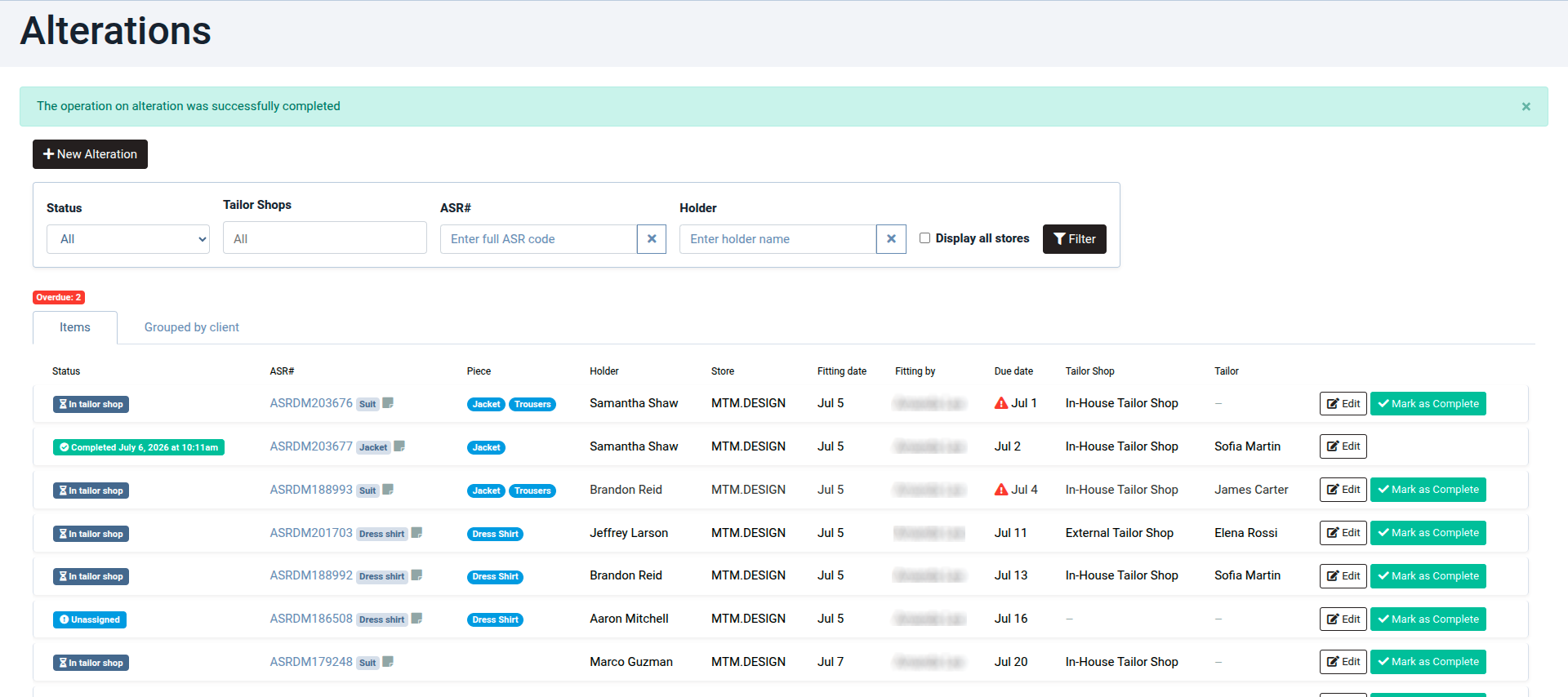
The Alterations queue is a new feature in MTM.Studio that gives clothiers a single, structured place for every alteration their team handles. Instead of relying on notebooks, sticky notes, or shared inboxes, every alteration is created, assigned, logged, and completed inside the same interface your team already uses to manage production.
It is built for high-volume clothiers who need visibility on every item moving through the workroom.
How the Alterations queue works
1. Create an alteration
Every alteration starts as an entry in the queue. You can create one from an existing item in your MTM.Studio catalog, pulling in the client, the garment, and the history automatically. Or you can create it from scratch when the piece isn't already in the system. This second option handles walk-in alterations on pieces you didn't originally make.
2. Assign to a tailor shop and a specific tailor
Once created, the alteration is assigned first to a tailor shop (useful if your business has multiple locations or partners with external ateliers), then to a specific tailor within that shop. The result: clear ownership from day one. There's no ambiguity about who is responsible for the work.
3. Log work as it happens
As the tailor progresses through the alteration, each step gets logged with a timestamp. This creates a running record of what was done and when. It's useful for coordination between shifts, for accountability, and for pricing conversations down the line.
4. Track the full queue
Anyone on your team can open the queue and see the full picture: what's open, what's in progress, what's ready to hand back to the client. No more "let me check with the tailor" phone tag between the sales floor and the workroom.
5. Edit, complete, or delete
When the piece is ready, the alteration is closed out. The record stays in the system for future reference. If plans change mid-workflow, entries can also be edited or deleted at any time.
Why an alterations workflow matters for your business
The value of the Alterations queue is less about the individual features and more about what it prevents. Consider what typically goes wrong at scale:
A client returns for pickup, but the alteration wasn't done. Nobody knew.
A tailor finishes work, but the sales team wasn't notified. The client waits an extra day.
A shift changes hands, and the work log doesn't travel with it.
A dispute arises about what was requested versus what was done. Nothing was written down.
Each of these has a business cost. Sometimes a small one, sometimes a large one. All of them chip away at the trust that took months of good work to build. The queue makes each of these harder to happen.
Who should use the Alterations queue
If your business handles more than a handful of alterations a week, you will benefit. In practice, the boutiques and clothiers who see the biggest gains are:
High-volume made-to-measure operations with multiple tailors and steady weekly throughput
Boutiques with in-house alterations teams and a formal separation between sales and workroom
Businesses working with external tailor shops where handoffs need to be tracked across organizations
If you're a solo clothier working out of a single space with a small clientele, a notebook is probably fine. If you're anything larger, the queue starts to earn its keep quickly.
